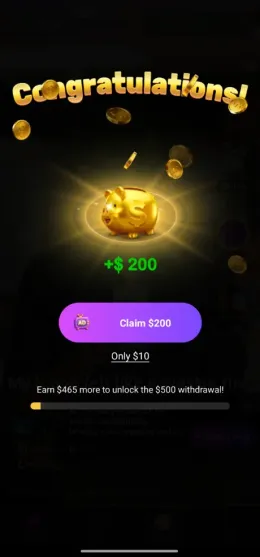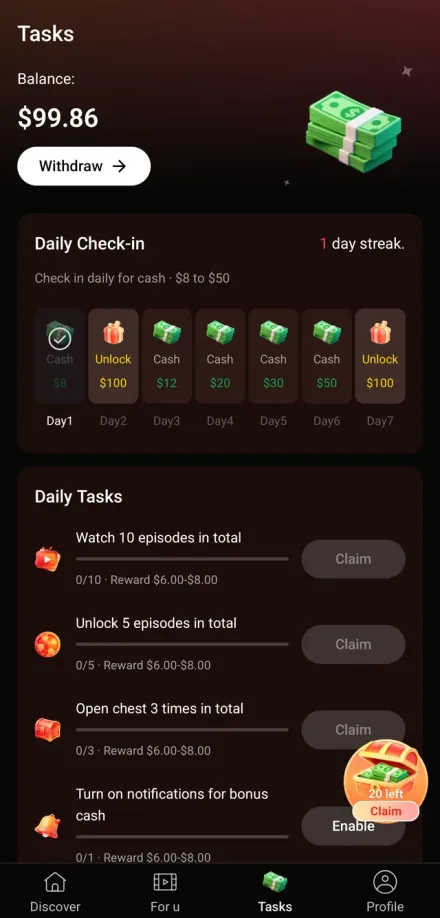
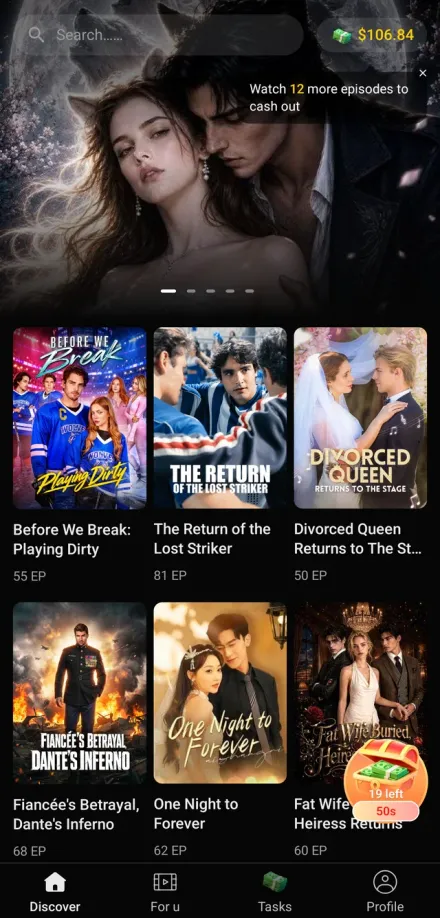
CashDrama (package com.reward.drama.earn.watch.tool on Google Play) pitches itself as a short-drama app that rewards you with cash for watching vertical mini-series. In our hands-on inspection, the balance climbed to $99.86 and $106.84 on Day 1—yet the Withdraw Now button stayed disabled behind shifting episode and day-unlock gates.
What CashDrama is and how the interface works
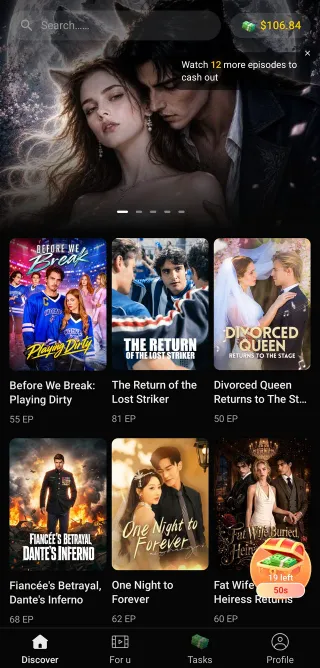
Inside the Android app, CashDrama is organized into four bottom tabs: Discover, For u, Tasks, and Profile. The Discover and For u feeds stream vertical romance, werewolf, and revenge mini-series such as Rejected Luna is His Fated Mate, Before We Break: Playing Dirty, and The Return of the Lost Striker.
On top of the video catalog sits an aggressive cash-reward overlay: a floating green balance badge in the top-right corner, a persistent banner urging you to 'Watch 12 more episodes to cash out,' and a floating treasure chest counting down tasks.
CashDrama on Google Play (com.reward.drama.earn.watch.tool)
Why balances reach $100 so quickly (red flag)
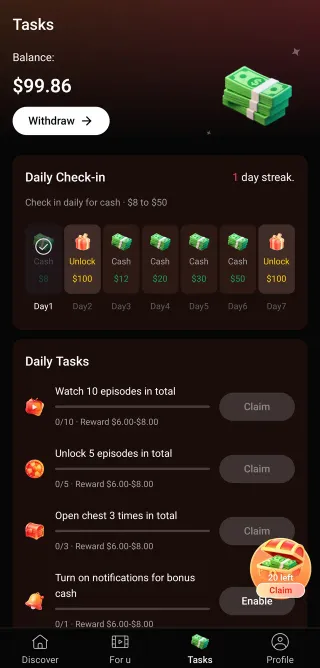
Unlike legitimate survey or offerwall apps that pay cents per task, CashDrama's Tasks tab advertises $6.00 to $8.00 per daily task (such as watching 10 episodes, unlocking 5 episodes, opening chests, or enabling notifications) and a 7-day check-in promising $8 on Day 1 up to $50 on Day 6 and '$100 Unlock' milestones on Day 2 and Day 7.
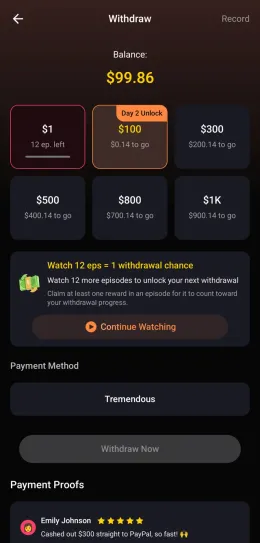
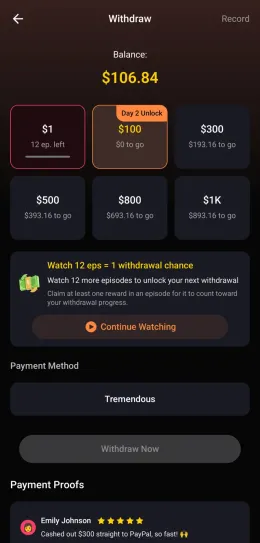
In our test screens, the balance started at $99.86—just $0.14 shy of the $100 card—and crossed $106.84 within minutes. Inflated early balances are a classic retention hook designed to keep users watching ad-supported episodes in hopes of unlocking a large payout.
Is CashDrama legit or a scam for making money?
While CashDrama is distributed through the official Google Play Store, independent user reports and our own inspection of its locked withdrawal flow strongly indicate it does not function as a reliable real-money app. Even after passing $100, users face multi-step hurdles before any payout button activates.
If you only want free vertical dramas, treat the dollar counter as decorative. If your goal is actual withdrawable cash, avoid investing hours chasing the $100–$1K tiers shown in the app. We also documented the same pattern in our Cash Fortune Drama review and $500 withdrawal test and our 2026 short drama apps comparison.
How to get started
- Verify the exact package ID (com.reward.drama.earn.watch.tool) on Google Play and avoid third-party APK clones.
- Open the Withdraw tab before doing tasks to check the active episode-count and Day Unlock locks.
- Do not treat inflated $6–$8 task rewards or $99.86 starting balances as real withdrawable money.
- Avoid enabling intrusive notification permissions solely for bonus cash claims.
- Use established reward platforms with transparent, low-threshold payouts if you want side income.
What works well
- Vertical short-drama catalog is accessible in Discover and For u tabs without an upfront subscription.
- Lists a recognizable payout processor name (Tremendous) on the withdrawal screen.
What to keep in mind
- Unrealistic $6–$50 task/check-in amounts inflate the balance to $100+ while keeping Withdraw Now disabled.
- Requires watching 12 episodes with claimed rewards per withdrawal chance plus Day 2 Unlock gates.
- Displays generic, unverifiable in-app Payment Proofs claiming $100–$800 instant payouts.
The apps308 take
CashDrama is not recommended as a money-making app. Its fast $99.86–$106.84 balance growth and $100–$1K withdrawal cards mask strict episode and day-unlock barriers that prevent straightforward cashouts.
Frequently asked questions
Is the CashDrama app legit?
CashDrama is a real Android app on Google Play, but its cash-reward promises are heavily gated. Our inspection showed a $106.84 balance with the Withdraw Now button still disabled.
Does CashDrama really pay $100 or $300?
We could not verify any payout. Reaching $100 on Day 1 still leaves the tier locked behind 'Day 2 Unlock' and 'Watch 12 more episodes' requirements.
Is CashDrama safe to install?
Installing from Google Play avoids unofficial APK malware risks, though users report heavy ad exposure and should deny unnecessary permissions.