Editorial transparency: some links and invite codes on this page are affiliate or referral links. We may earn a commission or referral bonus at no extra cost to you. Our reviews and verdicts remain independent. Terms & Disclaimer.
Swagbucks surveys trade time for a possible reward; Shop & Earn rebates part of an eligible purchase. They need different checks: qualification and time spent for surveys, purchase terms and tracking for shopping. This guide explains those two workflows using our supplied dashboard capture and Swagbucks help pages. It does not report a completed purchase or an earnings test.
Survey disqualification, missing credit and disabled surveys are different
A survey that says you do not qualify has ended without completion. Swagbucks explains that a study may need a different profile or already have enough participants. One screening rejection is different from having surveys disabled across the account.
Read the final message before deciding that a reward is missing. Changing demographic answers to get past the filter is not a solution: keep your profile truthful and answer the actual question. If the screen confirms completion instead, use the credit-check steps below.
Swagbucks: survey disqualification
Compare the time cost with the dashboard, not a daily earnings promise
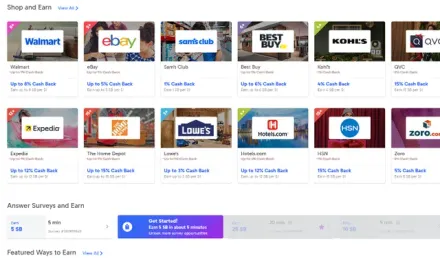
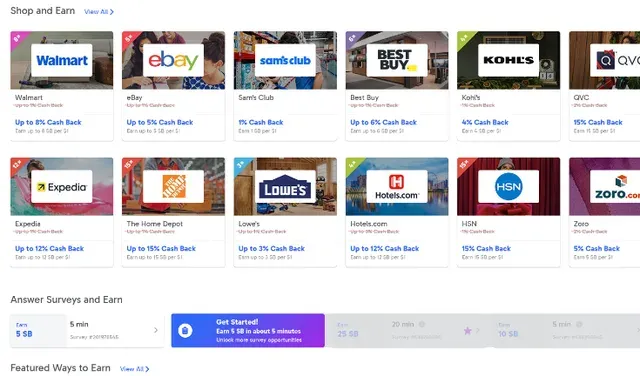
The capture used in this article shows survey examples of 5 SB for 5 minutes, 10 SB for 5 minutes and 25 SB for 20 minutes. These are examples from that screen, not offers verified as available now or in every country. The displayed estimate also is not a guarantee that you will qualify or finish in that time.
For those examples, divide SB by estimated minutes: 1, 2 and 1.25 SB per minute respectively. The largest headline reward is not the best ratio. Set your own time limit and include time spent on unsuccessful attempts when reviewing whether surveys are worthwhile; do not extrapolate the best card into an hourly income.
Swagbucks: survey profile and opportunities
Shopping cashback applies to the eligible purchase, not every charge
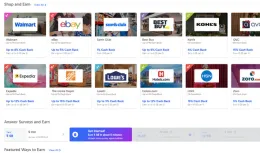
Open the retailer from Shop & Earn and read its Special Terms before paying. Swagbucks says eligible amounts can exclude taxes, shipping and other charges; returns or cancellations can reverse rewards. Store-specific exclusions matter more than the largest rate on the directory card.
Illustrative calculation: if a store offers 5 SB per eligible US dollar and only US$40 of a US$48 checkout qualifies, the expected reward is 200 SB, not 240 SB. This is a calculation example, not a current store offer. Compare the full checkout price with other shops before treating cashback as a saving.
Check whether the shopping visit tracked before spending
The official tracking guide recommends starting from Swagbucks, staying on the same device and avoiding competing shopping extensions. Those extensions or restrictive privacy settings can prevent the click from being attributed. An outside coupon is not automatically compatible: check the retailer terms instead of assuming that every discount can be combined.
After clicking through, check the Activity ledger for the visit and keep the offer terms and order confirmation. If you are unwilling to allow the tracking the offer needs, compare prices without counting on its SB. A screenshot or receipt is evidence for a review, not a guarantee that missing attribution can be repaired.
Visited, Pending and Posted: what the Activity ledger tells you
Visited records a click; it is not proof that a purchase qualified. Pending means a tracked reward is awaiting posting, with details and an estimated credit date. Posted is the credited activity. This distinction avoids confusing an acknowledged shopping visit with spendable SB.
Use the date and activity filters to find the correct transaction. When an order has a pending date, wait for that date before treating it as overdue. If the offer is absent or overdue, use the help option connected to that activity and describe the discrepancy, rather than opening unrelated requests.
What to do when a finished survey or a purchase has no SB
For a survey, save the Survey ID and completion message, check Answer in the Activity ledger, and respect any delayed-credit period stated before starting. If the stated time has passed with no credit, use Get Help for that survey. A disqualification message should not be presented as proof of completion.
For shopping, distinguish the wait for an order to appear from the later wait for pending SB to post. Consult the current help page and the store’s Special Terms for its own time window; there is no single promise covering every retailer, travel reservation or order. Keep the receipt and avoid buying more just to investigate an untracked purchase.
How to get started
- Check which surveys and Shop & Earn stores your own account and country can access.
- For surveys, compare SB with estimated minutes and answer honestly; record a completed survey’s ID.
- For shopping, compare the full price first, then save the retailer’s rate, exclusions and waiting period.
- Start the eligible purchase from Swagbucks on the same device and check the visit in Activity.
- Review Pending and Posted separately; use help on the relevant activity only when its stated wait has passed.
What works well
- Surveys can be considered without making a purchase.
- The Activity ledger separates visits, pending rewards and credited SB.
What to keep in mind
- A survey estimate does not guarantee qualification, completion or a reward.
- Shopping requires spending and successful attribution; rates and waiting periods vary.
The apps308 take
Choose surveys by the time you can afford to lose on screening, and use shopping cashback only for a planned purchase at a competitive final price. Track the difference between a click, a pending reward and credited SB before assuming that anything is missing.
Frequently asked questions
Why do Swagbucks surveys keep disqualifying me?
A study may need a different profile or its quota may already be full. Read the final message; a screen-out is different from completing the survey and not receiving its stated credit.
Does Pending SB mean I can redeem it?
No. Pending records a reward awaiting posting. Check its expected date and verify that it has moved to credited activity before counting on it for redemption.
Can I combine a coupon with Swagbucks cashback?
Only assume compatibility when the retailer’s Special Terms support it. Other shopping extensions and outside coupons can interfere with attribution or eligibility.
Are the rates in the screenshot still available?
They are examples from the supplied capture, not current offers checked in your account. Consult your own survey dashboard and retailer terms before starting.
Official sources
- Swagbucks: How It Works
- Swagbucks: Play Games
- Swagbucks: Paid Online Surveys
- Swagbucks: Shop and Earn Cashback
- Swagbucks: Rewards Store
- Prodege: Terms of Use
- Swagbucks: survey disqualification
- Swagbucks: survey profile and opportunities
- Swagbucks: Shop & Earn rules
- Swagbucks: how offer tracking works
- Swagbucks: Activity ledger
- Swagbucks: completed survey missing SB