Editorial transparency: some links and invite codes on this page are affiliate or referral links. We may earn a commission or referral bonus at no extra cost to you. Our reviews and verdicts remain independent. Terms & Disclaimer.
67080261 is the Run Team invite code we tested on Android: entering it in the Invitation ID form credited R$5 (about US$1) to the cash balance immediately. This guide shows the exact buttons, the reward screens after submission and the referral rules, whether you searched for the Run Team invite code, the RunTeam invitation ID or a Run Team referral code.
What the Run Team invite code pays
The entry bonus is R$5 (about US$1) in the green cash balance, credited once per account right after Submit. In our recording the cash counter moved from R$0 to R$5 and the small badge beside it changed from 0% to 10%.
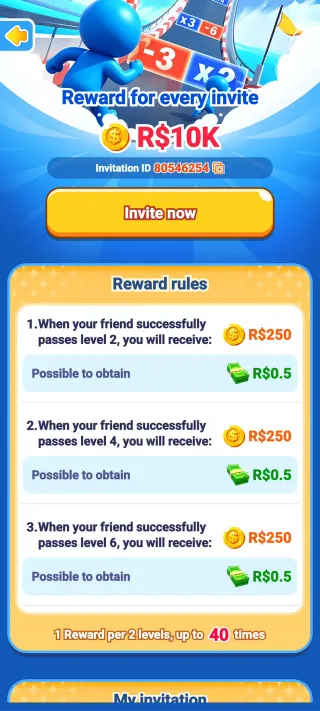
Run Team keeps two balances: gold coins and green cash. The invite headline 'Reward for every invite R$10K' and the R$250 milestone figures carry the coin icon, while the cash side of each milestone is labelled 'Possible to obtain R$0.5' (about US$0.09). Coins are in-game points, not withdrawable money.
The bonus registers an inviter for your account. After submission the form locks as 'Filled in' and the Invite page lists the code under 'My inviter', so a second code cannot be added later.
Run Team invite code at a glance
| Item | What we verified |
|---|---|
| Invite code (Invitation ID) | 67080261 |
| Entry bonus | +R$5 cash (about US$1), once per account |
| Entry route | Invite tile or ID icon (R$5) → 'Fill in ID Reward' |
| Field label | 'Enter your friend's invite ID' |
| After submission | 'Congratulations' R$5, then 'rewards have been issued' / 'Filled in' |
| Referrer milestones | Friend levels 2, 4, 6: R$250 coins + possible R$0.5 cash each |
| Referral cap | 1 reward per 2 levels, up to 40 times |
| Your own code | 'Invitation ID' bar at the top of the Invite page |
| Currency | Recording in R$ (Brazil); values vary by region |
Where to enter the Run Team invitation ID
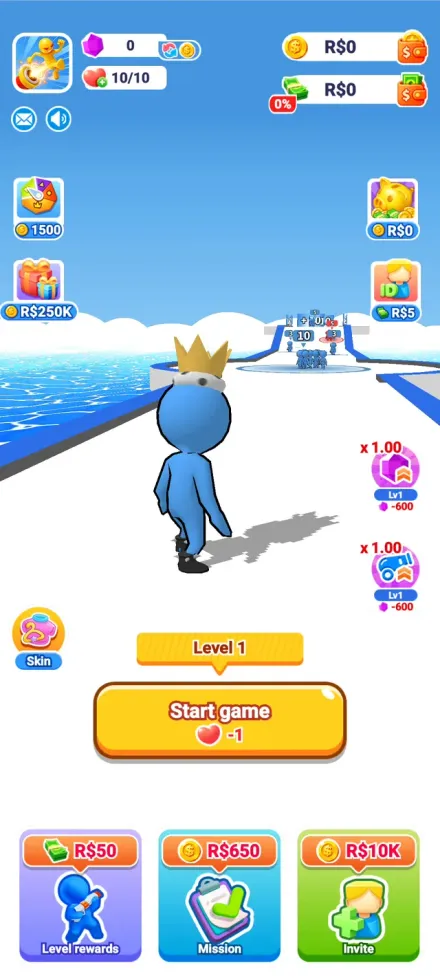
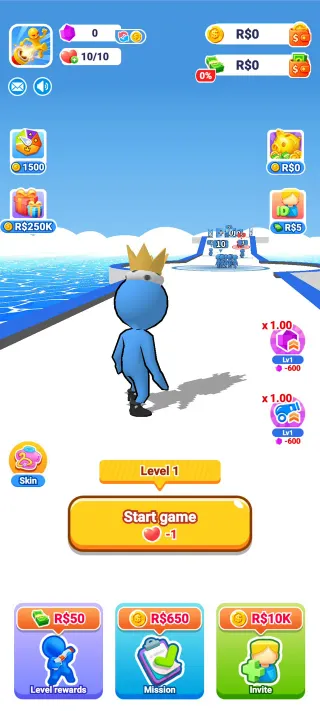
On the home screen, two shortcuts open the same Invite page: the green 'Invite' tile labelled R$10K at the bottom right, and the small ID-card icon marked R$5 on the right edge. The ID icon is the entry-bonus shortcut; the Invite tile also shows your own code and the referral rules.
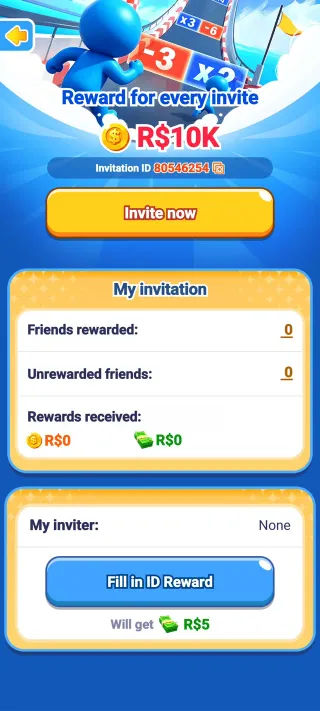
Scroll past the rules on the Invite page to the 'My inviter' panel. Before any code is registered it reads 'None', which is the state required to claim the entry bonus.
Open the form with Fill in ID Reward
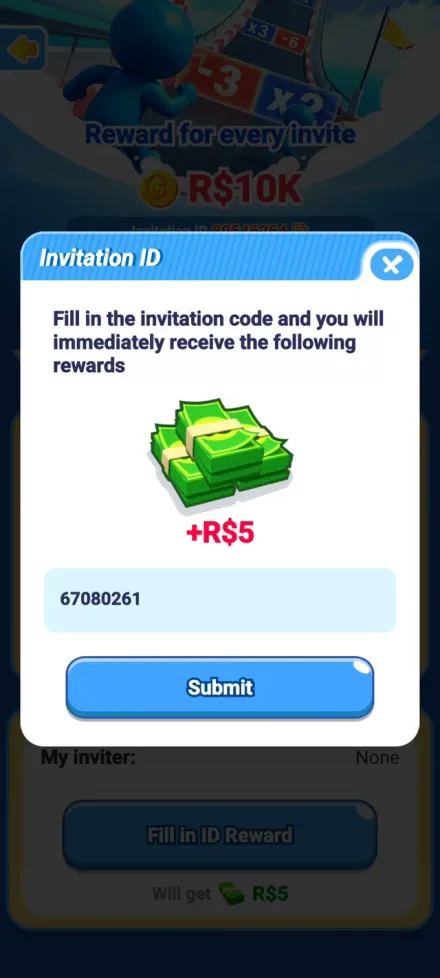
Tap the blue 'Fill in ID Reward' button inside the 'My inviter' panel. The line below it, 'Will get R$5', states the entry bonus for registering a friend's code.
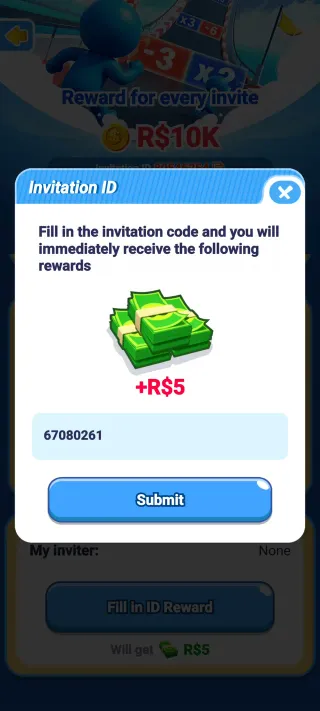
The 'Invitation ID' dialog opens with the message 'Fill in the invitation code and you will immediately receive the following rewards' and a +R$5 cash bundle above the input field.
Type the code and tap Submit
Type or paste 67080261 into the field labelled 'Enter your friend's invite ID' and tap 'Submit'. The recording shows the eight-digit ID entered in full before submission; any valid friend's Invitation ID works the same way, because the reward comes from registering an inviter, not from the specific digits.
How to get started
- Open Run Team and tap the Invite tile (R$10K) or the ID icon marked R$5.
- Scroll to the 'My inviter' panel and tap 'Fill in ID Reward'.
- Enter 67080261 in the 'Enter your friend's invite ID' field.
- Tap Submit, then 'I understand' on the Congratulations popup.
- Return to the home screen and check the cash balance: R$5 with the 10% badge.
The reward screens after submission
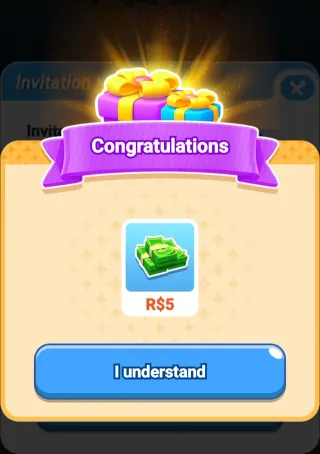
Immediately after Submit, a 'Congratulations' popup displays the green cash bundle labelled R$5 with an 'I understand' button.
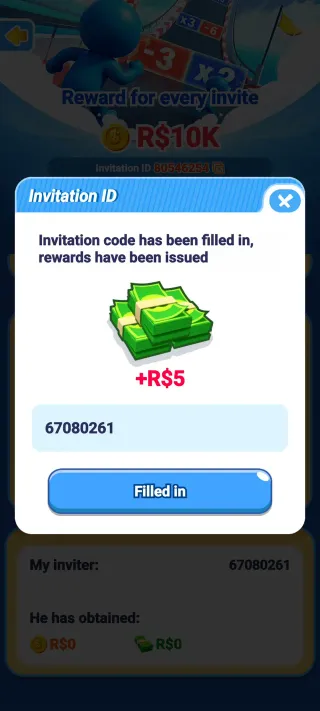
Closing it returns to the Invitation ID dialog, now reading 'Invitation code has been filled in, rewards have been issued', with 67080261 locked in the field and the button renamed 'Filled in'.
Confirm the inviter registered on your account
On the Invite page, 'My inviter' now shows 67080261. The 'He has obtained' line stayed at R$0 coins and R$0 cash: the inviter earns only when the invited account passes the milestone levels, not at registration.
Check the balance and find your own Invitation ID
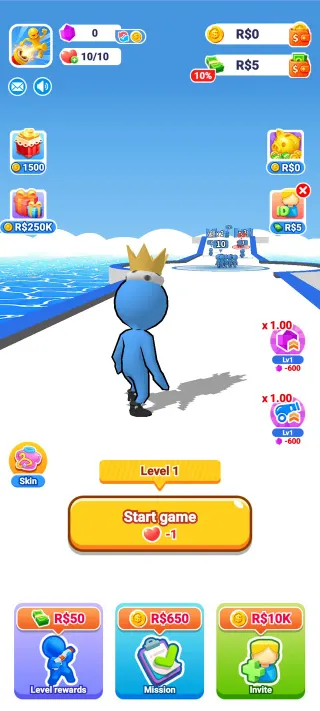
Back on the home screen the green cash balance reads R$5 and the badge shows 10%. The recording never opens a withdrawal screen, so treat the percentage as an in-app progress marker: this guide confirms the bonus credit, not a cashout threshold or a payment.
Your own code sits in the 'Invitation ID' bar at the top of the Invite page, with a copy icon (our test account showed 80546254). Sharing it is how the referrer side of the program earns: R$250 in coins plus a possible R$0.5 in cash each time a friend passes levels 2, 4 and 6, up to 40 rewards.
If you prefer reward programs with published payout terms instead of unverified in-app balances, compare them in our Freecash starter guide.
If the Run Team code is not accepted
Check that the field contains exactly eight digits with no spaces, and that 'My inviter' still reads 'None': accounts that already registered an inviter see the locked 'Filled in' form instead of a new submission.
Currency and amounts are regionalized. Our recording ran in Brazilian reais (R$5, about US$1); players in other countries see other currencies and figures, so compare the rules on your own screen rather than the exact numbers here.
Install only from DotVerse's official Google Play listing (package com.runteam.android) and avoid modified APKs promising extra cash. The 'successfully withdrawn' ticker on the invite landing page is marketing, not independent payment proof.
What works well
- The R$5 entry bonus appeared immediately after Submit in our recording.
- The form asks only for the invitation ID, with no personal or payment data.
- Every screen from the home shortcut to the locked 'Filled in' state is documented.
- Your own Invitation ID can be copied from the Invite page in one tap.
What to keep in mind
- No withdrawal screen appears in the recording: R$5 is in-app balance, not confirmed payment.
- The R$10K headline and R$250 milestones are coin values; the cash side is only 'possible to obtain R$0.5'.
- The entry bonus is one-time per account; a second code cannot be registered.
- Amounts and currency are regionalized, so your screen may differ from the R$ figures shown.
The apps308 take
Enter 67080261, or any friend's Invitation ID, once through Invite → 'Fill in ID Reward' → Submit to claim the R$5 (about US$1) entry bonus shown in our test. Treat the R$10K headline and every larger figure as coins or marketing: the recording confirms the bonus credit, not a cashout.
Frequently asked questions
What is the Run Team invite code?
67080261 is the Invitation ID we entered in our Android test, also searched as the RunTeam invite code or Run Team referral code. Any valid friend's Invitation ID works the same way.
Where do I enter the Run Team invitation ID?
On the Invite page (green Invite tile or the ID icon marked R$5), scroll to 'My inviter', tap 'Fill in ID Reward', type the code in 'Enter your friend's invite ID' and tap Submit.
What bonus does the Run Team invite code give?
R$5 (about US$1) in the cash balance immediately after submission, once per account. The inviter separately earns R$250 in coins plus a possible R$0.5 in cash when the friend passes levels 2, 4 and 6, up to 40 rewards.
Does the Run Team invite code work on any account?
The bonus is one-time: accounts that already show a code under 'My inviter' get the locked 'Filled in' form. Eligibility is defined by the app, and our recording covers a single device.
Can I withdraw the R$5 bonus right away?
The recording shows only the balance and a 10% badge, never a withdrawal screen or a payment. Treat the R$5 as in-app balance until the app's own cashout conditions are met and confirmed.
Where is my own Run Team Invitation ID?
In the 'Invitation ID' bar at the top of the Invite page, next to a copy icon. Our test account displayed 80546254 there; that is the code to share with friends.
Is it safe to enter a Run Team invite code?
The form asks only for digits, no personal or payment data. Install Run Team only from DotVerse's official Google Play listing (com.runteam.android), and ignore landing-page withdrawal tickers or modified APKs promising extra cash.